
Your internal IT team is stretched thin. Tickets pile up. Security patches fall behind. Strategic projects stall because your staff is buried in daily firefighting. This is not a staffing problem. It is a capacity and depth problem, and it affects businesses across every industry and size.
Co managed IT services offer a structured solution. Instead of replacing your IT staff, you bring in a managed IT services partner to share the workload. Your team keeps ownership of day-to-day IT operations. The MSP adds the tools, specialist skills, and coverage you currently lack.
This guide explains how co managed IT support works, what it costs, which industries benefit most, and what separates a strong provider from a poor one. By the end, you will have everything you need to decide whether this model is right for your business.
What Are Co Managed IT Services?
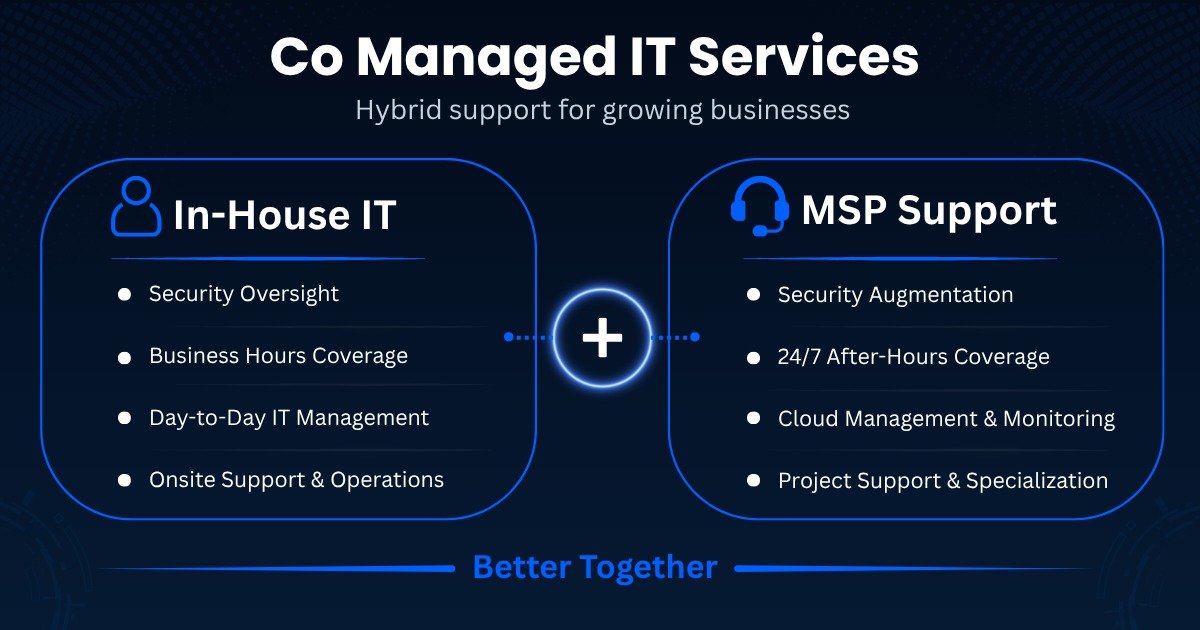
Co managed IT services is a partnership model where a business retains its internal IT team and contracts an external managed service provider to handle specific functions alongside them. The two parties divide responsibilities based on skill gaps, workload, and business priorities. Unlike fully outsourced IT support, your internal team stays involved and in control of IT operations.
The internal team typically handles business-specific systems, user relationships, and on-site support. The MSP takes on areas where the internal team lacks capacity or depth, such as network monitoring, endpoint security, IT compliance, or after-hours managed help desk services. This division is documented and agreed upon before the engagement begins, which is what separates a well-structured co managed arrangement from one that creates confusion and overlap.
The co managed IT model is flexible by design. One business may need the MSP to manage its entire cloud infrastructure while internal staff focuses on application support. Another may need managed cybersecurity services and proactive monitoring only. The model adapts to where your actual gaps are, not a predetermined service package.
How Do Co Managed IT Services Work?
Co managed IT services begin with a structured assessment of your current environment. The MSP reviews your infrastructure, identifies coverage gaps, and maps which responsibilities your internal team already owns. From that baseline, both parties agree on a clear service split before any work begins.
The MSP and your internal team then operate from shared platforms. These typically include a remote monitoring and management (RMM) tool for network monitoring and endpoint security, a unified ticketing system for managed help desk services, and a security dashboard covering your full environment. Many co managed IT providers deploy Microsoft 365 management, backup, and disaster recovery tooling as part of this stack. Your team gains access to enterprise-grade IT service management without bearing the full licensing cost.
Communication is structured throughout the engagement. Most co managed arrangements include a shared escalation process, defined SLAs for each service tier, and a regular cadence of business reviews. The goal is a hybrid IT environment where your team and the MSP function as a single unit, not two groups working in parallel with separate priorities.
Benefits of Co Managed IT Services
Businesses that adopt co managed IT support consistently report three structural changes: faster incident response, a stronger security posture, and a shift from reactive to proactive IT operations. These outcomes are not incidental. They follow directly from combining internal institutional knowledge with MSP tools and specialist depth.
The core benefits span cost, capability, and coverage:
- Cost control: You pay only for the services you need. You avoid the recruiting, onboarding, and retention costs of hiring additional specialists.
- Access to deep expertise: Your team gains immediate access to security engineers, cloud architects, compliance specialists, and IT service management professionals through IT team augmentation.
- 24/7 coverage: The MSP handles after-hours monitoring and managed help desk services without requiring overnight staffing from your side.
- Proactive IT support: Issues are identified and resolved before they cause downtime, not after users report problems.
- Reduced staff burnout: Your internal team shifts from firefighting to strategic IT planning, which improves retention and long-term performance.
- Enterprise tooling: MSPs provide access to RMM platforms, endpoint security tools, and backup systems that most internal teams cannot afford to license independently.
Gartner identifies cybersecurity talent shortages as one of the most critical operational challenges facing IT leaders today. Co managed IT solutions directly address that gap without requiring businesses to restructure their internal teams or increase permanent headcount.
Co Managed IT Services vs Fully Managed IT Services
These two models serve fundamentally different needs. Choosing the wrong one creates friction, wasted budget, or a loss of operational control that is difficult to reverse once the engagement is in place.
Co managed IT services keep your internal team in place and add MSP support where it is needed. Fully managed IT services replace your internal IT function entirely, with the MSP taking on all IT operations and responsibilities. Co managed suits businesses that have IT staff and want to strengthen them. Fully managed suits businesses that have no internal IT capability and need a complete outsourced IT department from day one.
| Factor | Co Managed IT | Fully Managed IT |
|---|---|---|
| Internal IT team | Retained | Replaced or not required |
| Operational control | Shared | Delegated to MSP |
| Best for | Mid-market businesses with IT staff | Small businesses or startups |
| Cost model | Supplemental fee | Comprehensive flat fee |
| Customization | High | Moderate |
| Transition complexity | Lower | Higher |
Most growing mid-market businesses fall into the co managed category. They have IT staff with solid operational knowledge but lack depth in cybersecurity services, IT compliance, cloud infrastructure, or business continuity planning. For a detailed breakdown of provider types, see our MSP vs MSSP comparison.
Co Managed IT Services vs Outsourced IT Support
Co managed IT services and outsourced IT support are often used interchangeably, but they describe different operating models. Understanding the distinction helps businesses avoid choosing a service structure that does not match their actual situation.
Outsourced IT support typically refers to replacing your internal IT function with a third-party provider. The MSP takes full ownership of IT operations, and your internal team is reduced or eliminated. This model suits businesses that have decided not to maintain an internal IT function at all. Our outsourced IT support guide covers this model in depth.
The co managed IT model works differently. Your internal team stays in place and retains authority over IT decisions and business-critical systems. The MSP supplements that team with specific services, tools, and specialist expertise. Your team gains an IT support partner without losing the institutional knowledge and user relationships your staff has built.
| Factor | Co Managed IT | Outsourced IT Support |
|---|---|---|
| Internal IT staff | Retained | Reduced or replaced |
| IT decision authority | Shared | Transferred to MSP |
| Best for | Businesses with existing IT staff | Businesses outsourcing their IT department |
| Flexibility | High | Moderate |
| Onboarding complexity | Lower | Higher |
The right choice depends on whether your internal team is an asset you want to keep or a function you want to transfer. Most growing businesses with one or more IT staff members are better served by the co managed model.
When Should a Business Choose Co Managed IT Support?
Timing matters when adopting co managed IT support. Moving too early can waste budget on services your team does not yet need. Waiting too long exposes the business to security incidents, compliance failures, and avoidable downtime.
A business should consider co managed IT support when its internal team is consistently overwhelmed, when specialist skills are missing, or when 24/7 coverage is not achievable with current headcount. It is also the right model when IT compliance requirements are growing faster than the team can manage, or when the business is scaling into a hybrid IT environment that demands new expertise.
These are the clearest indicators it is time to act:
- Your IT team spends more than 60 percent of its time on reactive support rather than planned strategic IT planning
- You have experienced a security incident or a close call in the past 12 months
- You are entering a regulated industry such as healthcare, finance, or legal services
- You are adding remote workers, new office locations, or acquiring another business
- Strategic IT projects are repeatedly delayed because the team has no capacity
- You lack in-house expertise in endpoint security, disaster recovery, or Microsoft 365 management
If three or more of these apply, co managed IT solutions deserve immediate evaluation. Businesses that delay typically do so until after an incident has already occurred.
How Much Do Co Managed IT Services Cost?
Co managed IT pricing varies based on the scope of services, number of users or devices, and the complexity of your environment. Most providers structure co managed IT support pricing around one of two models: per user or per device. Understanding both helps you compare quotes accurately and avoid underestimating total cost.
Per-user pricing is common for organizations focused on endpoint management, Microsoft 365 management, and help desk support. Typical per-user fees for co managed IT services range from $30 to $100 per user per month depending on the service tier.
Per-device pricing is more common when network monitoring, server management, and infrastructure oversight are the primary services. Device-based fees typically range from $20 to $80 per device per month.
Factors that affect co managed IT pricing include:
- Number of users and devices in scope
- Whether 24/7 monitoring and after-hours help desk support are included
- The depth of cybersecurity services and managed cybersecurity services required
- Compliance management obligations such as HIPAA, PCI-DSS, or ISO 27001
- Whether cloud infrastructure management or Microsoft 365 administration is in scope
- The size and complexity of your existing IT environment
Small business vs mid-market pricing: A small business with 25 users and basic monitoring needs may spend between $1,500 and $3,000 per month. A mid-market business with 150 users requiring full security, compliance support, and cloud management may spend between $8,000 and $20,000 per month. Both outcomes represent significant savings over the fully loaded cost of hiring equivalent specialist staff.
Comparing co managed IT support pricing to internal hiring costs is the most accurate benchmark. A single cybersecurity engineer costs between $90,000 and $130,000 annually in the US before benefits and overhead. Access to that same expertise through a co managed IT provider typically costs a fraction of that figure. For small businesses evaluating options, our managed IT services for small businesses guide includes additional cost benchmarks.
How Co Managed IT Services Reduce IT Costs
Beyond direct pricing, co managed IT services deliver cost reductions through four mechanisms that are often overlooked during initial budget conversations.
Avoided downtime costs: Forrester research indicates unplanned IT downtime can cost organizations thousands of dollars per minute in lost productivity, revenue, and recovery expenses. Proactive IT support and continuous network monitoring from an MSP reduce that exposure directly. Businesses with proactive monitoring report significantly fewer unplanned outages than those relying on reactive break-fix support.
Shared tooling costs: RMM platforms, endpoint security tools, backup and disaster recovery systems, and IT service management platforms are expensive to license individually. MSPs spread those costs across their entire client base, making enterprise-grade tooling available at a fraction of the standalone price.
Reduced recruitment and training costs: Building specialist IT capability internally requires recruiting, onboarding, and ongoing training investment. Co managed IT solutions provide immediate access to specialists without that overhead.
Predictable monthly billing: Fixed service fees replace unpredictable break-fix invoices and emergency contractor costs. IT spending becomes easier to forecast, which simplifies budget planning across the business.
Example of a Successful Co Managed IT Engagement
A 200-person law firm with two internal IT staff members was experiencing growing operational pressure. The internal team managed day-to-day IT support for all staff but had no capacity for security monitoring, patch management, or compliance documentation. The ticket backlog was running at three to five days for non-critical issues. The firm had also received a warning from its cyber insurance provider about inadequate endpoint security controls.
The firm engaged a co managed IT provider to handle network monitoring, endpoint security, managed cybersecurity services, and after-hours help desk support. The internal team retained ownership of vendor relationships, user provisioning, and on-site hardware. Both teams operated from a shared ticketing platform, with clear priority and routing rules agreed before go-live.
Within 60 days, the ticket backlog dropped to under 24 hours for non-critical issues. The MSP identified and remediated three unpatched server vulnerabilities during the first monthly security review. The firm’s cyber insurance provider confirmed the new endpoint security controls met their requirements at the next renewal. The internal IT team, now free from overnight monitoring responsibilities, completed two infrastructure improvement projects that had been stalled for more than a year.
This outcome is representative of what a well-structured co managed IT engagement achieves. The results are not dramatic. They are practical, measurable, and sustainable.
Common Challenges Solved by Co Managed IT Services
Many businesses delay seeking additional IT support because they assume their challenges are unique or too complex to address incrementally. In practice, the problems that drive businesses toward co managed IT support are consistent and entirely addressable.
After-hours coverage gaps: Most internal IT teams work standard business hours. Cybersecurity incidents and system failures do not follow the same schedule. An MSP provides 24/7 network monitoring and managed help desk services without requiring overnight staffing from your side.
Cybersecurity skill shortages: IBM reports that the average cost of a data breach reached $4.88 million in 2024, with a significant gap between organizations that had security expertise and those that did not. Co managed IT services give businesses access to managed cybersecurity services and security operations capability that most internal teams cannot build independently. For businesses evaluating dedicated security options, see our cybersecurity partner guide.
IT compliance requirements: Regulations such as HIPAA, PCI-DSS, and ISO 27001 require ongoing documentation, control monitoring, and audit readiness. MSPs with compliance experience accelerate this work and reduce the risk of a failed audit or regulatory penalty.
Cloud infrastructure complexity: Managing a hybrid IT environment across Microsoft Azure, Microsoft 365, or multi-cloud platforms requires skills that many internal teams have not had time to develop. Co managed IT providers with cloud certifications address that gap immediately.
Business continuity gaps: Many businesses have no tested disaster recovery process in place. An MSP can implement, document, and regularly test backup and disaster recovery systems to ensure the business can recover quickly from an incident. Our IT support services guide covers related continuity options.
What to Look for in a Co Managed IT Provider
Not every managed service provider is built for a co managed engagement. Some MSPs prefer fully managed relationships and lack the process discipline and communication structure needed to work effectively alongside an internal IT team. Selecting the wrong co managed IT provider creates more problems than it solves.
A strong co managed IT provider will have documented experience working with internal IT teams in place, not just replacing them. Ask for at least two references from clients where an internal team remained active throughout the engagement. A provider that cannot offer those references has likely not built the operational model that co managed requires.
Common implementation mistakes to avoid:
- Engaging a provider before documenting your current IT responsibilities. Starting without a clear baseline leads to duplication and gaps.
- Accepting a co managed arrangement where service boundaries are verbal rather than written. If it is not in the contract, it does not exist.
- Selecting a provider based on price alone. A low-cost co managed IT provider that lacks co managed delivery experience will cost more in friction and rework than a better-fitted provider at a higher price.
- Skipping the knowledge transfer phase during onboarding. If the MSP does not understand your environment in detail before going live, response quality will be poor for the first several months.
Evaluate every co managed IT provider against these criteria before signing:
- Defined service boundaries: Responsibilities for each party must be documented in writing. Unclear ownership creates gaps and blame during incidents.
- Tool compatibility: The MSP’s RMM platform and ticketing system should integrate with your existing environment without a full rebuild.
- Security credentials: Look for SOC 2 Type II, Microsoft Gold Partner or Cisco Premier status, and alignment with NIST or CIS Controls.
- Help desk support routing: Understand how tickets escalate between the MSP and your internal team, and who owns a critical incident at 2am.
- Communication cadence: A named account manager and monthly business reviews are minimum requirements, not extras.
- Remote workforce support: If your team is distributed, confirm the MSP has experience managing endpoints and access security across multiple locations.
You can also search for IT managed service providers near you to identify local options with in-person support capability.
Industries That Benefit from Co Managed IT Services
Co managed IT solutions deliver value across industries, but certain sectors see the strongest results. These are typically businesses with compliance obligations, dispersed workforces, or IT complexity that consistently outpaces internal team capacity.
Healthcare: Organizations face HIPAA compliance requirements, electronic health records management, and expanding telehealth infrastructure. Internal IT teams in healthcare are often small relative to the complexity they support. Co managed IT services add compliance expertise, proactive monitoring, and managed cybersecurity services that these environments require.
Financial services: Firms navigate PCI-DSS compliance, fraud detection systems, and strict regulatory reporting obligations. An MSP with financial sector experience reduces audit risk and strengthens IT operations without requiring the firm to build a large internal security team.
Manufacturing: Businesses are increasingly managing both IT and operational technology (OT) environments. Most internal manufacturing IT teams lack OT security expertise. A co managed provider with industrial experience addresses that gap before it becomes a liability.
Legal: Law firms handle highly sensitive client data and have become a primary ransomware target. Co managed IT support strengthens endpoint security and disaster recovery without requiring firms to build out a large IT department. This sector is one of the strongest use cases for IT team augmentation.
Education: School districts and universities manage thousands of endpoints across dispersed campuses and growing remote learner populations. Co managed IT services provide the coverage and IT service management structure that internal teams cannot sustain at that scale.
Future Trends in Co Managed IT Services
The managed IT services market is evolving quickly. Businesses that understand where the industry is heading can make smarter provider choices today and avoid locking into arrangements that will limit them within the next two to three years.
AI-driven threat detection is changing how MSPs deliver managed cybersecurity services. MSPs are deploying machine learning tools that reduce the time between initial detection and containment of security incidents. Cisco and Microsoft have embedded AI capabilities directly into their security platforms, and MSP partners are extending those capabilities to their co managed clients at a scale that individual businesses cannot replicate independently.
Zero trust architecture is becoming the standard security model for businesses of all sizes. Gartner projects that zero trust will be the default framework for enterprise security within this decade. MSPs are building zero trust delivery practices that internal teams can adopt incrementally rather than requiring a full infrastructure rebuild from scratch.
Compliance automation is growing in demand across every regulated industry. MSPs that offer automated IT compliance monitoring, continuous evidence collection, and audit support are becoming more valuable as regulatory requirements expand in scope and frequency.
The overall scope of the co managed IT model is expanding. MSPs are taking on deeper roles in Microsoft 365 management, cloud infrastructure optimization, strategic IT planning, and business continuity program management. The model is shifting from supplemental support to a genuine IT partnership that covers both operations and strategy.
FAQ Section
Q: What is the difference between co managed IT services and outsourced IT support?
Co managed IT services keep your internal team in place and add MSP resources alongside them. Outsourced IT support typically replaces your internal team entirely. Co managed is the right model for businesses that want to retain operational control while adding specialist expertise, deeper coverage, and proactive IT support through an IT support partner.
Q: How much do co managed IT services cost?
Most co managed IT providers charge between $30 and $100 per user per month or $20 to $80 per device per month depending on the services included. A 25-user small business may spend $1,500 to $3,000 monthly. A 150-user mid-market business with security and compliance needs may spend $8,000 to $20,000 monthly.
Q: Can a small business use co managed IT support?
Yes, provided there is at least one internal IT staff member in place. The co managed IT model works at any scale. Small businesses with one or two IT staff members benefit from co managed support for help desk overflow, network monitoring, and endpoint security. Businesses with no internal IT capability typically need a fully managed or outsourced IT department arrangement instead.
Q: Will a co managed IT provider conflict with my internal IT team?
Not when the engagement is structured correctly. Strong co managed IT providers document every responsibility in writing, use shared tooling, and communicate with internal staff through a defined process. They work alongside your team, not around them. A provider that cannot clearly describe how it manages internal team relationships is a provider to avoid.
Q: What services are typically included in a co managed IT arrangement?
Common services include 24/7 network monitoring, managed help desk services, endpoint security, backup and disaster recovery, patch management, IT compliance management, cloud infrastructure support, and Microsoft 365 management. The exact scope is built around your internal team’s existing capabilities and identified gaps, not a standard package.
Q: How long does it take to onboard a co managed IT provider?
Onboarding typically takes two to six weeks depending on environment complexity and the scope of the service split. A structured onboarding process includes an infrastructure audit, documentation of existing responsibilities, shared tooling deployment, and a knowledge transfer phase to align both teams before the engagement goes live.
Q: Is co managed IT support suitable for remote or hybrid workforces?
Yes. Co managed IT support is well-suited to distributed and hybrid workforces. MSPs provide remote workforce support including endpoint management, remote access security, and managed help desk services across multiple locations without on-site presence at every site. This makes the co managed IT model highly cost-effective for businesses managing a hybrid IT environment.
Q: What security certifications should a co managed IT provider hold?
Look for SOC 2 Type II certification, Microsoft Gold Partner or Cisco Premier status, and alignment with NIST or CIS Controls. These credentials confirm the provider meets established security and operational standards. They also indicate the provider has invested in genuine managed cybersecurity services infrastructure, not just basic monitoring tools.
Conclusion
Co managed IT services give growing businesses a practical and scalable way to close the gap between what their internal team can deliver and what the business actually needs. You retain the institutional knowledge and user relationships your team has built. You add the capacity, tools, and specialist expertise that a lean team cannot sustain on its own.
The decision factors are clear. If your IT team is reactive rather than strategic, if security or IT compliance gaps are growing, or if you are scaling into a hybrid IT environment faster than your headcount allows, co managed IT support is worth acting on now. Waiting until after an incident is a costly way to learn that lesson.
Choose a co managed IT provider that has built its delivery model around working alongside internal teams. Define every responsibility in writing before the engagement starts. Insist on transparency around SLAs, escalation paths, and communication structure. Avoid any MSP that cannot describe how it manages the relationship with your internal team specifically.
Businesses that execute this well reduce costs, strengthen business continuity, and free their IT teams to focus on strategic IT planning that actually moves the business forward.